01 September 2014

VMware goes deeper on OpenStack

If you think VMware has just been fooling around with OpenStack, think again. Oh sure, VMware would prefer if you bought into vCloud Air, but VMware didn't need a weatherman to know which way the clouds were moving. They're moving to open source's OpenStack.

So it came as no surprise to me that at VMworld, VMware announced its VMware Integrated OpenStack (VIO). This new software offering, which is available in a limited beta today, is an OpenStack distribution optimized to work with VMware's other software-defined data center components — compute, networking, storage and management, not just the hypervisor for building enterprise-class OpenStack clouds.

The key word in this announcement is "enterprise." In the past, VMware has supported OpenStack open-source components, talked about how VMware could work with OpenStack, and even partnered with Canonical, among others, to deploy VMware vSphere and Nicira NVP with Canonical's OpenStack distribution. All very nice, but it wasn't anything you could put into ordinary business users' hands.

VIO, however, is meant not for programmers but for customers. VMware says "organizations, particularly enterprises, have found deploying OpenStack can be time and resource intensive, and the underlying infrastructure does not always meet their requirements for security, resilience and performance. Once deployed, an OpenStack cloud can require ongoing consultant support, hard-to-find OpenStack experts or considerable staff education and training in order to maintain operations. IT has also lacked the critical management capabilities to ensure ongoing success of sophisticated OpenStack production deployments in the enterprise."

In short, VIO is an OpenStack distribution. It takes all those messy, techie parts and turns them into an install-and-run package.

Specifically, VMware will be providing customers with an OpenStack VMware running on top of VMware vSphere, VMware NSX and VMware Virtual SAN. The company claims that VIO "VMware will be able to meet the requirements of both IT departments and developers. For developers, the solution provides self-service API access to enterprise-class VMware infrastructure, enabling them to deliver applications faster and more efficiently without worrying about the details of the underlying infrastructure."

As for IT, VIO is meant to "deliver demonstrable operational cost savings and faster time-to-value. IT can be up and running with an OpenStack cloud in minutes, and the solution provides full integration with VMware administration and management tools, allowing customers to leverage existing VMware expertise to manage and troubleshoot an OpenStack cloud. Additionally, an OpenStack on VMware cloud will help customers repatriate workloads that have been moved to the public cloud by creating a more developer-friendly, yet highly secure and reliable private cloud environment."

Can VMware deliver? I don't see why not. They're already a member of the OpenStack Foundation, they've contributed code to the program, and Linux distributors such as SUSE and Ubuntu already support VMware technologies on OpenStack.

Indeed,in a statement, John Zannos, Canonical's VP of cloud alliances, said, "We have worked closely to make mutual customers successful on Ubuntu, the most popular operating system for running OpenStack, OpenStack and VMware products such as VMware vSphere and VMware NSX. Canonical and VMware are focused on driving enterprise adoption of OpenStack as organizations seek to implement developer-friendly OpenStack APIs and tools in their software-defined data center. VMware's continued focus on OpenStack and its collaboration with Canonical show our mutual commitment to offering solutions and services to the growing base of OpenStack users."

So, yes, VMware can, and will, make VIO work. My question is, as more and more companies commit to OpenStack, where will that leave all the other private cloud software stacks such as Microsoft Azure and Apache CloudStack? I see interesting times ahead as OpenStack companies, such as Red Hat and HP, battle with each other and VMware, and all the OpenStack companies take on the rest of he private cloud world

18 April 2014

5 Things To Consider When Building Your Disaster Recovery Plan

5 Things To Consider When Building Your Disaster Recovery Plan


For anyone tasked with developing an IT disaster recovery (DR) plan, the alphabet soup of DR options talked about today by service providers, software vendors, analysts and pundits can be truly bewildering. Against this backdrop, analysts like Gartner predict dramatic growth in both the consumption and hype of “cloudwashed” DR services. For example, John Morency of Gartner claims,RaaS has been hailed as a ‘killer’ cloud app for disaster recovery, but the reality is that there has been much hype and some truth.
I agree.
With the lack of standardization, it’s increasingly complex to map DR business requirements to business processes, service requirements and technology. How do you make sense of it all?
Start with the basics – protect your business by protecting critical IT operations and utilizing new technologies only where they make sense. Here are some things to think about as you consider DR in the context of modern, “cloudy” IT.
There is no such thing as DR to the Cloud (even though Rackspace has a DR to the Cloud solution).
There’s been a lot of buzz around utilizing cloud technology to improve the cost effectiveness of disaster recovery solutions. Vendors, analysts and others use terms like DRaaS, RaaS, DR-to-the-Cloud, etc. to describe various solutions. I’m talking about using cloud as a DR target for traditional environments, not cloud-to-cloud DR (that’s a whole other discussion). There’s one simple question underlying all this: If, when there is a disaster, these various protected workloads can run in the cloud, WHY AREN’T they there already? If security, governance and compliance don’t restrict those applications from running in a cloud during a DR event, they should be considered for running in the cloud today. Rackspace has a number of solutions for DR, including a “DR to the Cloud” for VMware environments.
YOU own your DR plan. Period.
Various software and services provide service level agreements for recovery time and recovery point objectives, but that doesn’t mean that if you consume those products, you have DR. For example, what exactly does the word recovery mean? Does it mean that a virtual machine is powered up or that your customers can successfully access your customer support portal? The point is, only your IT department can oversee that end customer (or employee in the case of internal systems) processes will be protected in the case of disaster. You can find help with BIAs, BCDR planning, hosting, etc. that provide key parts of a DR solution, but at the end of the day the ultimate responsibility for DR lies with the IT department.
Everyone wants DR, but no one wants to pay for it.
I’ve had lots of conversations with prospects and customers asking for really aggressive DR SLAs. Once they hear about how much it’s going to cost, the initial requirements change pretty quickly. The reality is that as objectives get more aggressive, the cost of DR infrastructure, software and labor begins to approach the cost of production. Careful use of techniques like using test/dev environments for DR, global load balancing of active/inactive workloads and less aggressive recovery time objectives can drive the cost of DR down to where it should be (about 25 percent of your production environments’ cost). Caution: Be skeptical of any solutions that promise both low cost and minimum downtime.
Service provider’s SLA penalties never match the true cost of downtime.
Ok, let’s be honest – unless you’re running an ecommerce site and you can measure the cost of downtime, you probably don’t know the true cost of downtime. Maybe you hired an expensive consultant and they told you the cost, but that’s based on an analysis with outputs highly sensitive to the inputs (and those inputs are highly subjective). This doesn’t mean that service provider SLA penalties don’t matter. Actually, strike that – service provider penalties don’t matter. A month of services or some other limited penalty in the event of missing a DR SLA won’t compensate for the unexpected downtime. If it did, then why are you paying for that stringent SLA in the first place? The point here is that only a well thought out and tested DR strategy will protect your business.
You don’t have DR if you don’t regularly test.
A DR solution is not “fire and forget.” To insure that your DR solution works, it’s recommended that you test at the user level at least quarterly. DR testing is also a significant part of the overall cost of DR and should be considered when building your business case. My advice if you implement a DR solution and don’t test it: Keep your resume up to date; you’ll need it in the event of a “disaster.”
There are many other things to consider when crafting your DR strategy – what keeps you up at night? Comment below and let us know.

18 March 2013

Our technology - An overview


We are currenty working on Openstack software and we think that at minimum we have to describe our underlying technology and make a better approach with our future customers:

Overview
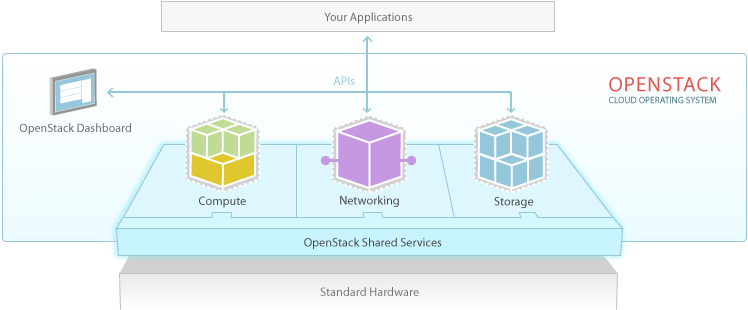
OpenStack is an Infrastructure as a Service offering. It is an Open Source project, founded by RackSpace, NASA and it can be deployed as a public or private cloud.
The OpenStack projects are: CINDER, GLANCE, KEYSTONE, NOVA, QUANTUM, SWIFT.

OpenStack Compute: (NOVA)
Project NOVA, or OpenStack Compute, provisions and manages on-demand virtual machines and associated resources (just like an VMware ESX or Hyper-V hypervisor): 
  • CPU
  • Memory
  • Disk
  • Network.
Virtual machines can be started, stopped, suspended, created and deleted, while network options for a virtual machine are static, DHCP, or IPv6. The virtual machines run on hypervisors such as XEN or KVM, but others are supported too - even VMware ESXi!
Users and administrators use the GUI to request virtual machines. To ensure a certain security level, there are security groups, similar to AWS, to control access to virtual machines and RBAC to govern user access by role and project.

Storage
Object Storage (project SWIFT)
Object Storage is a distributed storage system for static data such as files (graphics, movies) and virtual machine images. Objects and files are written to multiple disk drives, while OpenStack is responsible for ensuring data replication and integrity. Storage scales horizontally by adding new servers. If a server or hard drive fails, OpenStack replicates its content from other active servers to new servers in the cluster. Since OpenStack uses software to ensure data replication and distribution across servers, inexpensive servers can be used rather than expensive storage hardware.

Block storage (project CINDER)
Block storage is essentially volumes used by OpenStack virtual machines. Snapshots back up data stored on block storage volumes. Snapshots can be restored or used to create a new block storage volume.

Network (project QUANTUM)
OpenStack provides networking models to accommodate different applications or users. Standard network models include flat networks or VLANs to separate servers and network traffic. OpenStack Networking manages IP addresses, to allocate static or DHCP addresses. Floating IP addresses allow traffic to be dynamically rerouted to any compute resource, for example to redirect traffic during maintenance or in the case of a failure. OpenStack Networking has an extension framework to add intrusion detection systems (IDS), load balancing, firewalls and virtual private networks (VPN) .

Shared Services
Identity services (project KEYSTONE)
OpenStack Identity provides a central repository of users mapped to the OpenStack services they can access. OpenStack identity is a common authentication system and integrates with existing back-end directory services such as LDAP. It supports several forms of authentication including username and password, tokens and AWS (Amazon Web Services)-type logins. The identity service also provides a list of  deployed services that can be queried in the OpenStack cloud and users can determine their level of access.


OpenStack
OpenStack Administrators can:
  • Configure centralized policies across users and systems
  • Create users and tenants and define permissions for compute, storage and networking resources using role-based access control (RBAC)
  • Integrate with an existing directory like LDAP, allowing for a single source of identity authentication across the cloud.

Image services (Project GLANCE)
The OpenStack Image Service provides discovery, registration and delivery services for disk and server images. Saved images can be used as a template to get new virtual servers up and running (especially useful for multiple servers of the same type and configuration). It can also be used to store and catalog an unlimited number of backups.
The image service stores private and public images in a variety of formats:
  • AMI
  • qcow2 (Qemu/KVM)
  • OVF (Open Virtualization Format)
  • RAW
  • VDI (VirtualBox)
  • VHD (Hyper-V)
  • VMDK (VMWare)


06 March 2013

Current projects

Hi everyone,
We are currently working on OpenStack.org IaaS and performing test implementations.
Current configurations include from an All-in-one server installation to a segregated and scaled implementation of multi-node server setup.
The development of infrastructure includes integration of NAS, SAN storage, quantum network computing and Vyatta(r) router configurations to implement a fully integrated Cloud solution.
Now we are looking for some more test implementations; if you are interested please contact us at: besmirzanaj@gmail.com.

Creating a new LDAP server with FreeIPA and configure to allow vSphere authentication

Was setting up a new FreeIPA sever for my homelab and found out that the default configuration in FreeIPA does not allow you to use VMware v...